-
Showing posts with label Subscription Box. Show all posts

10 February 2013

Attractive Rss Subscribe Box For Blogger

VM | 5:52 pm | | Be the first to comment!
This Tutorial will help you to add beautiful subscribe box for your blogger.This is WordPress style.You can add this subscribe box to end of the post.So, you can add this easily.


1. Log in to blogger account and Click drop down.


2. Now select "Template" Like Below.


3. Now you can see Live on blog, Click EDIT HTML Button"

4. Now click Proceed button.
   
5. Find this tag by using Ctrl+F    ]]></b:skin>

6. Paste below code Before ]]></b:skin> tag

 #Subscribe{background:#D00 url(http://1.bp.blogspot.com/-rlmc0ojAP6w/UEBbz7z4kvI/AAAAAAAABAU/YuSXNdMxB6U/s72/email.png) no-repeat 98% center;border-radius:5px;box-shadow:0 0 30px #600 inset;height:100px;margin:5px auto 0;padding:10px;width:700px;}
#Subscribe .Arrow{background:url(http://3.bp.blogspot.com/-GpemTsHpc4w/UEBbgb44xHI/AAAAAAAABAE/mDTUyfvnksg/s72/Left.png) no-repeat;float:left;height:70px;margin:0 0 0 10px;width:80px}
#Subscribe form input.Text{background:#FFF;border:1px solid #800;border-radius:5px;box-shadow:0 0 5px #600 inset;color:#333;float:left;padding:5px 10px;width:145px}
#Subscribe .headline{color:#FFF;font-size:24px;margin:5px 0 0 60px}
#Subscribe table{margin:10px 0 0 100px;}
#Subscribe form input.Button{background-color:#148314;background-image:url(http://3.bp.blogspot.com/--9RbYGLhmI8/UAp2hm47JEI/AAAAAAAAAxI/t_neer3k3IM/s36/Subscribe.png);border:1px solid #7a7a7a;border-radius:5px;color:#fff;padding:5px 10px;position:relative;width:125px}

7. again Find this tag by using Ctrl+F    <data:post.body/>

8. Paste below code after <data:post.body/> tag

<!--NewsLetter Starts-->
<div id="Subscribe">
<p class="headline">Subscribe Updates, Its FREE!</p>
<form action='http://feedburner.google.com/fb/a/mailverify' method='post'
onsubmit='window.open(&apos;http://feedburner.google.com/fb/a/mailverify?
uri=yourfeedname&apos;, &apos;popupwindow&apos;, &apos;scrollbars=yes,width=550,
height=520&apos;);return true' target='popupwindow'> <table><tr><td><td>
<input name='Name' onblur='if (this.value == &quot;&quot;)
{this.value = &quot;Enter Your Name&quot;;}' onfocus='if
(this.value == &quot;Enter Your Name&quot;) {this.value = &quot;&quot;;}'
 class="Text" type='text' value='Enter Your Name'/></td><td><input name='email'
 onblur='if (this.value == &quot;&quot;) {this.value = &quot;Enter Your Email&quot;;}'
 onfocus='if (this.value == &quot;Enter Your Email&quot;) {this.value = &quot;&quot;;}'
 class="Text" type='text' value='Enter Your Email'/> <input name='uri' type='hidden'
 value='yourfeedname'/><input name='loc' type='hidden' value='en_US'/></td><td><input type='submit' class="Button" value='Subscribe Now'/></td></tr></table></form>
</div>
<!--NewsLetter Ends-->

Replace  yourfeedname with your feed name

11. Now save your template.

    You are done... 
Read More »

14 September 2012

Add Elegant Email Subscription/Signup Widget To Your Blog

VM | 11:52 pm | Be the first to comment!
Follow the steps below to add this email subscription widget to your blog.


Step #1  Add A New Gadget

Go to Blogger >> Design >> Add a new gadget >> HTML/JavaScript Widget.

Now add the following code in it.

/* BloggingeHow Email Subscription Widget*/

<center>
<div id="feature_box">
          <div id="sleek-subscribe">
                  <div class="newsheadline"><span>Sign-up</span> for <cite>FREE</cite> Regular Newsletter.</div>


<div id="email-news-subscribe"> <!-- Email Subscribe --> <div class="email-box">

    <form action="http://feedburner.google.com/fb/a/mailverify" method="post" target="popupwindow" onsubmit="window.open('http://feedburner.google.com/fb/a/mailverify?uri=Your Feed Burner Feed Name', 'popupwindow', 'scrollbars=yes,width=550,height=520');return true">  
            <input class="email" type="text" style="width: 450px; font-size: 15px;" id="email" name="email" value="Your Custom Text Goes Here" onfocus="if(this.value==this.defaultValue)this.value=&#39;&#39;;" onblur="if(this.value==&#39;&#39;)this.value=this.defaultValue;" />      
            <input type="hidden" value="Your Feed Burner Feed Name Here Too" name="uri" />
            <input type="hidden" name="loc" value="en_US" />
            <input class="subscribe" name="commit" type="submit" value="Subscribe" />  
        </form>


    </div> </div>


      </div>     
</div></center>

<style>
/*---:[ feature box ]:---*/
#feature_box { background: #eee; border-style: solid; border-color: #ddd; }

/*---:[ home page teasers ]:---*/
.teaser a.teaser_link:hover { text-decoration: underline; }
.teaser .teaser_author { font-style: italic; }
    .teaser .teaser_author .author { font-style: normal; text-transform: uppercase; letter-spacing: 1px; }
.teaser .edit_post { letter-spacing: 1px; }
    .teaser .teaser_author a, .teaser a.teaser_comments, .teaser a.teaser_category, .teaser .edit_post a { text-transform: uppercase; letter-spacing: 1px; color: #888; border-bottom: 1px solid #eee; }
    .teaser .teaser_author a { font-style: normal; }
    .teaser .format_teaser a { text-decoration: underline; }
    .teaser .format_teaser a:hover { text-decoration: none; }

/*---:[ border package ]:---*/
#header, .post_box, .teasers_box, #footer, .image_box, .custom_box, #feature_box, #archive_intro, .prev_next, #comment_nav_2 { border-width: 0; }

/*Featured Box*/
.custom #feature_box{background:#f0f4f4; border:1px solid #d9eaea; padding:10px 15px 5px;}
       
/* Subscription Box */
#sleek-subscribe{display: block; margin:0 auto; }
.newsheadline {padding-left:20px;color:#222; font-size:20px; line-height:50px; float:left; font-weight:bold;}
    .newsheadline span{font-size:38px; color:#444; line-height:14px; font-family:"Trebuchet MS"; font-weight:normal;}
    .newsheadline cite{font-style:normal; color:#f00;}
.signform{background:url('images/form-bg.jpg') no-repeat;padding:0 0 10px 100px; float:right; }
      .txt2, .txt2:focus{width:140px; font-size:15px; background:#fff; color:#92c3c3; border:1px solid #E36B0A; margin:0 5px; float:left; padding:10px; width:160px; border-radius: 10px;}
      .btn2, .btn2:focus {background:#E36B0A; margin:0 5px; padding:8px 10px 9px; border:1px solid #AD5513; color:#fff; font-size:15px; border-radius:10px;}
            .btn2:hover{background:#6689b0; }

#email-news-subscribe .email-box{
        padding: 5px 10px;
        font-family: "Arial","Helvetica",sans-serif;
        border-top: 0;
        border-right: 1px solid #C7DBE2;
        border-left: 1px solid #C7DBE2;
        border-image: initial;
       height:34px;}
    #email-news-subscribe .email-box input.email{
        background:#FFFFFF;
        border: 1px solid #dedede;
        color: #999;
        padding: 7px 10px 8px 10px;
        -moz-border-radius: 3px;
        -webkit-border-radius: 3px;
        -o-border-radius: 3px;
        -ms-border-radius: 3px;
        -khtml-border-radius: 3px;
        border-radius: 3px;
        border-image: initial;
        font-family: "Arial","Helvetica",sans-serif;}  
    #email-news-subscribe .email-box input.email:focus{color:#333}  
    #email-news-subscribe .email-box input.subscribe{
        background: -moz-linear-gradient(center top,#FFCA00 0,#FF9B00 100%);
        background: -webkit-gradient(linear,left top,left bottom,color-stop(0,#FFCA00),color-stop(1,#FF9B00));
        background: -moz-linear-gradient(center top,#FFCA00 0,#FF9B00 100%);
        -pie-background: linear-gradient(270deg,#ffca00,#ff9b00);
        font-family: "Arial","Helvetica",sans-serif;
        border-radius:3px;
        -moz-border-radius:3px;
        -webkit-border-radius:3px;
        border:1px solid #cc7c00;
        color:white;
        text-shadow:#d08d00 1px 1px 0;
        padding:7px 14px;
        margin-left:3px;
        font-weight:bold;
        font-size:12px;
        cursor:pointer;
        border-image: initial;}
    #email-news-subscribe .email-box input.subscribe:hover{
        background: #ff9b00;
        background-image:-moz-linear-gradient(top,#ffda4d,#ff9b00);
        background-image:-webkit-gradient(linear,left top,left bottom,from(#ffda4d),to(#ff9b00));
        filter:progid:DXImageTransform.Microsoft.Gradient(startColorStr=#ffffff,endColorStr=#ebebeb);
        outline:0;-moz-box-shadow:0 0 3px #999;
        -webkit-box-shadow:0 0 3px #999;
        box-shadow:0 0 3px #999
        background:-webkit-gradient(linear,left top,left bottom,color-stop(0,#ffda4d),color-stop(1,#ff9b00));
        background:-moz-linear-gradient(center top,#ffda4d 0,#ff9b00 100%);
        -pie-background:linear-gradient(270deg,#ffda4d,#ff9b00);
        border-radius:3px;
        -moz-border-radius:3px;
        -webkit-border-radius:3px;
        border:1px solid #cc7c00;
        color:#FFFFFF;
        text-shadow:#d08d00 1px 1px 0}  
    #other-social-bar {
        background-color: #D8E6EB;
        box-shadow: 0 1px 1px #FFFFFF inset;
        padding: 0px;
        font-family: "Arial","Helvetica",sans-serif;
        font-weight:bold;
        overflow: hidden;
        border: 1px solid #B6D0DA;
           height:57px;
    }
</style>

<!--[if IE]>

    <style>
    #email-news-subscribe .email-box input.subscribe{
        background: #FFCA00;
        }
    </style>

    <![endif]-->

 Step #2 Customizations

I have highlighted the parts that you need to change. Change your feed burner feed name and add some interesting custom text.

Note: There is one important thing that you need to take care of. The widget is designed for BloggingeHow's width, so you have to readjust it as per your blog's width.

I have highlighted the width:450px section in green so that you can adjust it later.
Read More »

Custom Header FeedBurner Email Subscription Widget

VM | 11:13 pm | Be the first to comment!

Add the email subscription widget to your blog


 Go to Blogger Dashboard >> Layout >> Add a gadget >> HTML/JavaScript. And paste the entire code with in it.


<div class="fixed-widget"><div class="widget-container">

 
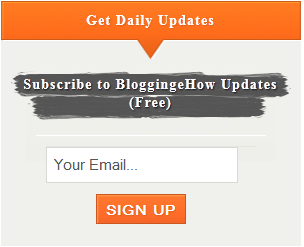
  <h1> Get Daily Updates</h1>

<p>Subscribe to BloggingeHow Updates (Free)</p>

<fieldset class="inputs">
<form target="popupwindow" onsubmit="window.open('http://feedburner.google.com/fb/a/mailverify?uri=bloggingehow', 'popupwindow', 'scrollbars=yes,width=550,height=520');return true" method="post" action="http://feedburner.google.com/fb/a/mailverify">
<input id="email" class="email" type="text" value="Your Email..." style="width: 192px; font-size: 15px;" onfocus="if(this.value==this.defaultValue)this.value='';" onblur="if(this.value=='')this.value=this.defaultValue;" name="email">
<input type="hidden" value="bloggingehow" name="uri">
<input type="hidden" value="en_US" name="loc">
<fieldset class="submit">
<input class="sean orange-btn" type="submit" value="Sign up" name="commit">


</fieldset>

</form>
</fieldset>
<span style=" line-height:0px; font-size:8px; font-weight:bold; margin-left:270px;
  ">
<a style="color:#D3D3D3;" href="http://www.bloggingehow.com">widgets</a></span>
</div>
</div>
<style>
 

.fixed-widget p {
    background: url("https://blogger.googleusercontent.com/img/b/R29vZ2xl/AVvXsEitAv2CD83yznRGh1FzW0sX8FpVyWkwC1Ay16dv-1zmzqsT2S8zAfkoqs0q73vTX_B72sttVvKX-TN2vEgeqdl1iVr3EXZNqdNQy-XFCFz4JIoOpjcREZp9G1iE3smmh5ep2Pv7RUCyTQc/s1600/highlight.png") no-repeat scroll center top transparent;
    color: #FFFFFF;
    font-size: 14px;
    font-weight: 700;
    height: 50px;
    letter-spacing: 0.08em;
    margin: 0 0 10px;
    padding-top: 4px;
    text-align: center;
    text-shadow: 1px 1px 1px #111111;
}
.fixed-widget input[type="text"], .fixed-widget input[type="email"] {
    border: 1px solid #D8D9D4;
    color: #555555;
    display: block;
    font-size: 14px;
    font-weight: 500;
    height: 36px;
    margin: 0 0 10px;
    padding-left: 6px;
    width: 192px;
}

.fixed-widget a:hover {
    color: #000000;
    text-decoration: none;
}
.fixed-widget fieldset, .fixed-widget form {
    margin: 0 auto;
    width: 210px;
}
.fixed-widget form {
    border-top: 1px solid #E5E5E1;
}
.fixed-widget fieldset.inputs {
    border: 0px;
    border-top: 1px solid #FFFFFF;
    padding-top: 10px;
}
.fixed-widget fieldset.inputs label {
    display: block;
    padding: 0 0 5px;
}
.fixed-widget fieldset.submit {
    border: 0px;
    padding: 1 50 10px;
}
.fixed-widget .orange-btn {
    background: url("https://blogger.googleusercontent.com/img/b/R29vZ2xl/AVvXsEiXNd4bOrr96sWDZ37NeqFUPxzsWGQMSs40AwFtyF2VE50Hzv0zKCOnnoD3ZTUvNZCgYew3xD6jW2ws8wtRWZWFUhwPswHV2oD59x_x6sB5V_EABdqUj4IxMCc8mTIuxUy9GmHFN4_D2KI/s1600/gradient-orange2.png") repeat-x scroll center top #FF6B29;
    border: 1px solid #CC5721;
    box-shadow: 1px 1px 1px #FFA04D inset;
    color: #FFFFFF;
    cursor: pointer;
    display: block;
    align:center;
    font-size: 14px;
    font-style: normal;
    font-weight: 700;
    height: 30px;
    letter-spacing: 1px;
    line-height: 28px;
    padding: 0 25 px;
    text-align: center;
    text-decoration: none;
    text-shadow: 1px 1px 1px #D35E24;
    text-transform: uppercase;
    width: auto;

}
.fixed-widget .orange-btn:hover {
    background: url("https://blogger.googleusercontent.com/img/b/R29vZ2xl/AVvXsEiXNd4bOrr96sWDZ37NeqFUPxzsWGQMSs40AwFtyF2VE50Hzv0zKCOnnoD3ZTUvNZCgYew3xD6jW2ws8wtRWZWFUhwPswHV2oD59x_x6sB5V_EABdqUj4IxMCc8mTIuxUy9GmHFN4_D2KI/s1600/gradient-orange2.png") repeat-x scroll center bottom #FF6B29;
}
.fixed-widget .orange-btn:active {
    position: relative;
    top: 1px;
}
.fixed-widget {
   
    width: 300px;
}
.widget-container {
    background: url("https://blogger.googleusercontent.com/img/b/R29vZ2xl/AVvXsEhk1-jIAnHk5i6IzjlvqCdzGHkGJqk2i7nr7N3QFPvjYGCIOsmmckCJqRo2ONOMEYUW5oiI9CqB74wrHZ1fV53gtizwwjAp0q_2eMUdD0oiaFJIUrY8GOAg1QHT6FUcYIJaP2pjFbxAY7s/s1600/gradient-big-grey2.jpeg") no-repeat scroll center top #F0F1EC;
   
}
.fixed-widget h1 {
    background: url("https://blogger.googleusercontent.com/img/b/R29vZ2xl/AVvXsEi_LgprrktoMv_1asPKMvZ-15kUzB5JKG4-Y_aL2WCAfUDOpM3GwCZuWAqoMDxcxvDZsRbCqYT1-KLJxHIn5-x1mZ7nIiabelJR6VTXNyktctfA3zl8UMwfMsEgNY7ey6_hcGDjYQTpbPw/s1600/fixed-sidebar-header.png") no-repeat scroll center top #F0F1EC;
    color: #FFFFFF;
    font-size: 14px;
    font-weight: 900;
    height: 60px;
    letter-spacing: 0.08em;
    line-height: 39px;
    margin: 0;
    padding-bottom: 10px;
    position: relative;
    text-align: center;
    text-shadow: 1px 1px 1px #D35E24;
}
</style>


Add the title of your choice by replacing the Get Daily Updates text while to replace the paragraph, edit Subscribe to BloggingeHow Updates (Free) text. Next you have to replace your FeedBurner email ID by replacing bloggingehow in both of its occurrence.

That's all, Now in the next step you have to add it to your blog. Before adding the finaly edited version, you can preview the widget in our Online HTML Editor.

Replacing the header?


To replace the header with a new custom one, simply replace this image https://blogger.googleusercontent.com/img/b/R29vZ2xl/AVvXsEi_LgprrktoMv_1asPKMvZ-15kUzB5JKG4-Y_aL2WCAfUDOpM3GwCZuWAqoMDxcxvDZsRbCqYT1-KLJxHIn5-x1mZ7nIiabelJR6VTXNyktctfA3zl8UMwfMsEgNY7ey6_hcGDjYQTpbPw/s1600/fixed-sidebar-header.png link with your new header background link. Make sure that the width of the header is 300x60px.
Read More »

Thesis Feedburner Email Subscription Widget

VM | 11:07 pm | Be the first to comment!


Thesis email subscription widget

How To Add The Widget To Blogger

Navigate towards Blogger Dashboard >> Layout >> Add a new Gadget >> HTML/JavaScript. Then paste the edit code (with all your customization links) in the widget and hit save.


 <!--BloggingeHow Thesis Email Subscription Widget -->
 <div id="singlesubscribe">
<p class="headline">Get Regular Updates, Its FREE!</p>
<span class="arrow"></span>

<form onsubmit="window.open('http://feedburner.google.com/fb/a/mailverify?uri=bloggingehow', 'popupwindow', 'scrollbars=yes,width=550,height=520');return true" target="popupwindow" method="post" action="http://feedburner.google.com/fb/a/mailverify">

<input id="email" class="txt" type="text" onblur="if(this.value=='')this.value=this.defaultValue;" onfocus="if(this.value==this.defaultValue)this.value='';" value="Enter your email :)" name="email" style="margin=left: 20px; width: 290px; font-size: 15px;">

<input type="hidden" name="uri" value="bloggingehow">
<input type="hidden" value="en_US" name="loc">
<input class="btn" type="submit" value="Subscribe" name="commit">

</div>
<span style=" line-height:0px; font-size:8px; font-weight:bold; align:right;
  ">
<a style="color:#D3D3D3;" href="http://www.bloggingehow.com">widgets</a></span>
</form>
</div>

<style>
#singlesubscribe {
    background: url("https://blogger.googleusercontent.com/img/b/R29vZ2xl/AVvXsEieoDBL4F-eoWDnXmmAR_AQmHaIEC-uuJ3QfMJ-JBpIL6hMFc1QfIyJeCJx6yMrZsucOjffZKWE5mJUUYfeTjglnU5ypoTGymBVzmPp1pTcORRnq6L86X9ugDyCG0QDmeijQxYLDI86bgE/s1600/email-icon-1.png") no-repeat scroll 98% center #6C87A6;
    border-radius: 5px 5px 5px 5px;
    box-shadow: 0 0 30px #575656 inset;
    margin: 5px auto 0;
    padding: 10px;
}
#singlesubscribe .headline {
    color: #FFFFFF;
    font-size: 24px;
    margin: 5px 0 0 60px;
}
#singlesubscribe .arrow {
    background: url("https://blogger.googleusercontent.com/img/b/R29vZ2xl/AVvXsEiBHLW2-mYNWSrIk8ZqySeQdU-_TPD7S9Yjw6ZALIYq4BJCgxGDcb8zixuwUHVNz_6TboI3YhtQEVKyYveF8YshbsRY9d2Vm2jhrdPD0SJaHPSI6Uqvkd42etv5yxbempBAq2QcGmCxqwQ/s1600/arrow-left.png") no-repeat scroll 0 0 transparent;
    float: left;
    height: 60px;
    margin: 0 0 0 20px;
    width: 60px;
}
#singlesubscribe form input.txt {
    background: none repeat scroll 0 0 #FFFFFF;border: 2px solid #575656;border-radius: 15px 15px 25px 5px;box-shadow: 0 0 8px #575656 inset;color: #575656;float: left;margin: 25px 10px 0 0;padding: 5px 10px;width: 145px;
}
#singlesubscribe form input.feedburner {
    width: 250px;
}
#singlesubscribe form input.btn {
    background: none repeat scroll 0 0 #222222;
    border: 0 none;
    border-radius: 10px 10px 10px 10px;
    box-shadow: 0 0 5px #000000 inset;
    color: #FFFFFF;
  
    font-weight: bold;
    margin: 25px 0 0;
    padding: 5px 10px;
    width: 100px;
}
#singlesubscribe form input.btn:hover {
    background: none repeat scroll 0 0 #111111;
}

</style>

 Simple replace both the instances of your Feed burner ID (replacing our ID i.e bloggingehow in the code above).


Thats all :)
Read More »

"Do You Like This Story?" - Best Blogger Widget!

VM | 4:27 pm | Be the first to comment!

do you like this story? blogger widget

After several trials and errors finally we managed to design a fully equipped blogger widget that contains Facebook Like & Send button,  Email Form (Subscription box) and social media icons. This widget can be found on many wordpress blogs added at the bottom of posts. It catches great attention of the visitor and forces him to like and share your article. That's why we named this gadget as "Do you like this story?" It is a more advance version of the widget I shared few days back which only offered visitors with a subscription option but this one offers a lot more. It will increase your Traffic through Facebook, Increase your subscribers, facebook fans and twitter followers. Indeed a magic box!

I have kept the installation process extremely easy so feel comfortable to try it.
  1. Go To Blogger > Design > Edit HTML
  2. Backup your template
  3. Check the "Expand Widget Templates" box
  4. Search for, 
<data:post.body/>
    5.   Just below it paste the following code,
<b:if cond='data:blog.pageType == &quot;item&quot;'>
<style>
form.emailform{
margin:20px 0 0;
display:block;
clear:both;
}
.mbttext{
background:url(https://blogger.googleusercontent.com/img/b/R29vZ2xl/AVvXsEhMpUf5hv25QJr01VD7vgsO05hXjC9Im5n4nVJJ-yrT424OxQbYXctY478QL9MyfmzHG4VNf8YV3-bMw0simOP-vMY3PawxVe1GDHFfJ25xnl5BXe40bfJr_nZNSW7zowVeNyPGXjfDFQpK/s28/w2b-mail.png) no-repeat scroll 4px center transparent;
padding:7px 15px 7px 35px;
color:#666;
font-weight:bold;
text-decoration:none;
border:1px solid #D3D3D3;
-moz-border-radius: 4px;
-webkit-border-radius: 4px;
border-radius: 4px;
-moz-box-shadow: 1px 1px 2px #CCC inset;
-webkit-box-shadow: 1px 1px 2px #CCC inset;
box-shadow: 1px 1px 2px #CCC inset;
}
.mbtbutton{
color:#666;
font-weight:bold;
text-decoration:none;
padding:6px 15px;
border:1px solid #D3D3D3;
cursor: pointer;
-moz-border-radius: 4px;
-webkit-border-radius: 4px;
-goog-ms-border-radius: 4px;
border-radius: 4px;
background: #fbfbfb;
background: -moz-linear-gradient(top, #fbfbfb 0%, #f4f4f4 100%);
background: -webkit-gradient(linear, left top, left bottom, color-stop(0%,#fbfbfb), color-stop(100%,#f4f4f4));
background: -webkit-linear-gradient(top, #fbfbfb 0%,#f4f4f4 100%);
background: -o-linear-gradient(top, #fbfbfb 0%,#f4f4f4 100%);
background: -ms-linear-gradient(top, #fbfbfb 0%,#f4f4f4 100%);
filter: progid:DXImageTransform.Microsoft.gradient( startColorstr=&#39;#FBFBFB&#39;, endColorstr=&#39;#F4F4F4&#39;,GradientType=0 );
background: linear-gradient(top, #fbfbfb 0%,#f4f4f4 100%);
}
#doulike-outer {
-moz-border-radius: 10px 10px 10px 10px;
-webkit-border-radius: 10px 10px 10px 10px;
-goog-ms-border-radius: 10px 10px 10px 10px;
border-radius: 10px;
background: none repeat scroll 0 0 transparent;
border: 1px solid #D3D3D3;
padding: 8px;
-moz-transition: all 0.3s ease-out;
-o-transition: all 0.3s ease-out;
-webkit-transition: all 0.3s ease-out;
-ms-transition: all 0.3s ease-out;
transition: all 0.3s ease-out;
width:480px;
}
#doulike-outer:hover{
background: none repeat scroll 0 0 #FFF;
-moz-box-shadow: 1px 1px 2px #CCC inset;
-webkit-box-shadow: 1px 1px 2px #CCC inset;
box-shadow: 1px 1px 2px #CCC inset;
}
#doulike-outer td{
padding:3px 0;
}
</style>
<div id='doulike-outer'>
<div id='doulike'>
<table width='100%'>
<tbody>
<span style='font-style: italic; font-size: 30px; font-family: arial,sans-serif, verdana;  color:#FF683F;'>Do you Like this story..?</span>
<tr>
<td>
<div id='fb-root'/><script src='http://connect.facebook.net/en_US/all.js#xfbml=1'/><fb:like font='' href='' layout='button_count' send='true' show_faces='false' width='300'/>
</td>
</tr>
<tr>
<td align='left'> <p style='color:#666; font-style:italic; margin:0px 0px 5px 0px; '>Get Free Email Updates Daily!</p>
<form action='http://feedburner.google.com/fb/a/mailverify' class='emailform' method='post' onsubmit='window.open(&apos;http://feedburner.google.com/fb/a/mailverify?uri=tntbystc&apos;, &apos;popupwindow&apos;, &apos;scrollbars=yes,width=550,height=520&apos;);return true' style='margin: 0pt;' target='popupwindow'>
<input name='uri' type='hidden' value='tntbystc'/>
<input name='loc' type='hidden' value='en_US'/>
<input class='mbttext' name='email' onblur='if (this.value == &quot;&quot;) {this.value = &quot;Enter your email...&quot;;}' onfocus='if (this.value == &quot;Enter your email...&quot;) {this.value = &quot;&quot;}' type='text' value='Enter your email...'/>
<input alt='' class='mbtbutton' title='' type='submit' value='Submit'/>
</form>
</td>

<td><p style='color:#666; font-style:italic; margin:0px 0px 5px 0px;  '>Follow us!</p>
<a href='http://feeds.feedburner.com/TntByStc' rel='nofollow' target='_blank' title='Suscribe to RSS Feed'><img src='https://blogger.googleusercontent.com/img/b/R29vZ2xl/AVvXsEgyMiSAb57QaUsGS58qesHXhmIliLYvoo86sUZlXhCEXQ2rGkJll9p5sorGrJ1U1z5ZKFjkLZ-8KBfAdBDLim3QoaW5A9pZN57PHfJKIfE3ULXYj7JdIVdJiNiYVbFptMMPZ7eDQ9yN5L6V/s40/w2bRSS+.png'/></a>
<a href='http://twitter.com/mybloggertricks' rel='nofollow' target='_blank' title='Follow us on Twitter'><img src='https://blogger.googleusercontent.com/img/b/R29vZ2xl/AVvXsEiNsPurMqx0mv7tUZUmZNh2moxUPDnXcSX0GJOwevxVBkhWv5t_bUEmW5VFpUt2WebiGSbjczmVowqzRyTvk0BbMdLPVGkyWYd1HiebLjIGzmYUqAd7_RJ-53t3tD22HZq22O4g2eU-aDxw/s40/w2bTwitter.png'/></a>
<a href='http://www.facebook.com/pages/My-Blogger-Tricks/147104632016744' rel='nofollow' target='_blank' title='Follow us on Facebook'><img src='https://blogger.googleusercontent.com/img/b/R29vZ2xl/AVvXsEh0Sj1mps5mTkNUvZLjsgxsjWh_OdCCBxsAvxY7HIULiAg_HYLvvUrutPKlADVvZUtn2dKGW5_3wvVHKs0DfeehEE6qPgaYu0a0kFEroWqlTlrv6F7syVPV3ksS6lS51hXQ1xJRQkTEtxbI/s40/w2bFaceBook.png'/></a>
</td>
</tr>
</tbody></table></div></div>
</b:if>
Now make these changes,
  • To change the colour of the "Do you like this story..?" text then simply change #FF683F  with a hexadecimal color of your choice.
  • Now replace http://feedburner.google.com/fb/a/mailverify?uri=tntbystc with your Feedburner Email Feed link. You can get it by visiting your feedburner account then navigate to Publicize and then to Email Subscriptions.
  • Replace tntbystc with your feed title. It appear at the end of your feed link. In my case it is http://feedburner.google.com/fb/a/mailverify?uri=tntbystc
  • Replace orange link with your Feedburner link
  • Replace the blue link with your twitter link
  • Replace the purple link with your Facebook Like Page link
After you have made all the necessary changes simply save your template and you are all done!
Visit any of your post to see it being displayed just perfectly. This gadget is compatible with all major browsers. I hope you find it helpful. I am busy with exam preparation these days so pardon me for late replies. Peace brothers! :)
Read More »

13 September 2012

Mashable Sharing Widget For Blogger - Version2

VM | 3:21 pm | Be the first to comment!


mashable sharing widget for blogger
We previously published the first bloggerized version of Mashable Sharing Plugin for wordpress and it was well received by all of you. At that time Google Plus badges were still under development and were not released and web masters often preferred third party plugins like "Add to Circle". Since now when Google plus is the hot social media networking site growing in numbers and traffic and with extra ordinary added Google Search features, I thought the mashable widget should be upgraded. I simply added a Google+ bade to the sharing widget and replaced the LinkedIn icon with twitter because most of you asked for it. Linkedin is a great place for business professionals to attract targeted clients  but if you have just started blogging and don't have much experience in freelancing then you may avoid it at an early stage. The installation is extremely easy and you simply need to copy and paste the code. That simple!


  1. Go To Blogger > Design
  2. Choose "Add a gadget"
  3. Select HTML/JavaScript Widget
  4. Paste the following code inside it, 
  <style>
    /* Social Widget */
    #MBT-mashable-bar {
        border: 0;
        margin-bottom: 10px;
        margin: 0 auto;
            width:300px;
    }
    .fb-likebox {
        background: #fff;
        padding: 10px 13px 0 10px;
        border-right: 1px solid #D8E6EB;
       border-left: 1px solid #D8E6EB;
       border-bottom: 1px solid #D8E6EB;
        margin:0px;
            height:45px;
    }
    .googleplus {
        background: #F5FCFE;
        border-top: 1px solid #FFF;
        border-bottom: 1px solid #ebebeb;
        border-right: 1px solid #D8E6EB;
        border-left: 1px solid #D8E6EB;
        border-image: initial;
        font-size: .90em;
        font-family: "Arial","Helvetica",sans-serif;
        color: #000;
        padding: 9px 11px;
        line-height: 1px;}
    .googleplus span {
        color: #000;
        font-size: 11px;
        position: absolute;
        display:inline-block;
        margin: 9px 70px;}
    .g-plusone {    float: left;}
.gplus {
        background: #fff;
        padding: 0px;
        border: 0px solid #C7DBE2;
        margin-bottom:-13px;}
    .twitter {
        background: #EEF9FD;
        padding: 10px;
        border: 1px solid #C7DBE2;
        border-top: 0;}
    #mashable {
        background: #EBEBEB;
        border: 1px solid #CCC;
        border-top: 1px solid white;
        padding: 2px 8px 2px 3px;
        text-align: right;
        border-image: initial;}
    #mashable .author-credit {}
    #mashable .author-credit a {
        font-size: 10px;
        font-weight: bold;
        text-shadow: 1px 1px white;
        color: #1E598E;
        text-decoration:none;}
    #email-news-subscribe .email-box{
        padding: 5px 10px;
        font-family: "Arial","Helvetica",sans-serif;
        border-top: 0;
        border-right: 1px solid #C7DBE2;
        border-left: 1px solid #C7DBE2;
        border-image: initial;
       height:35px;}
    #email-news-subscribe .email-box input.email{
        background:#FFFFFF;
        border: 1px solid #dedede;
        color: #999;
        padding: 7px 10px 8px 10px;
        -moz-border-radius: 3px;
        -webkit-border-radius: 3px;
        -o-border-radius: 3px;
        -ms-border-radius: 3px;
        -khtml-border-radius: 3px;
        border-radius: 3px;
        border-image: initial;
        font-family: "Arial","Helvetica",sans-serif;}  
    #email-news-subscribe .email-box input.email:focus{color:#333}  
    #email-news-subscribe .email-box input.subscribe{
        background: -moz-linear-gradient(center top,#FFCA00 0,#FF9B00 100%);
        background: -webkit-gradient(linear,left top,left bottom,color-stop(0,#FFCA00),color-stop(1,#FF9B00));
        background: -moz-linear-gradient(center top,#FFCA00 0,#FF9B00 100%);
        -pie-background: linear-gradient(270deg,#ffca00,#ff9b00);
        font-family: "Arial","Helvetica",sans-serif;
        border-radius:3px;
        -moz-border-radius:3px;
        -webkit-border-radius:3px;
        border:1px solid #cc7c00;
        color:white;
        text-shadow:#d08d00 1px 1px 0;
        padding:7px 14px;
        margin-left:3px;
        font-weight:bold;
        font-size:12px;
        cursor:pointer;
        border-image: initial;}
    #email-news-subscribe .email-box input.subscribe:hover{
        background: #ff9b00;
        background-image:-moz-linear-gradient(top,#ffda4d,#ff9b00);
        background-image:-webkit-gradient(linear,left top,left bottom,from(#ffda4d),to(#ff9b00));
        filter:progid:DXImageTransform.Microsoft.Gradient(startColorStr=#ffffff,endColorStr=#ebebeb);
        outline:0;-moz-box-shadow:0 0 3px #999;
        -webkit-box-shadow:0 0 3px #999;
        box-shadow:0 0 3px #999
        background:-webkit-gradient(linear,left top,left bottom,color-stop(0,#ffda4d),color-stop(1,#ff9b00));
        background:-moz-linear-gradient(center top,#ffda4d 0,#ff9b00 100%);
        -pie-background:linear-gradient(270deg,#ffda4d,#ff9b00);
        border-radius:3px;
        -moz-border-radius:3px;
        -webkit-border-radius:3px;
        border:1px solid #cc7c00;
        color:#FFFFFF;
        text-shadow:#d08d00 1px 1px 0}  
    #other-social-bar {
        background-color: #D8E6EB;
        box-shadow: 0 1px 1px #FFFFFF inset;
        padding: 0px;
        font-family: "Arial","Helvetica",sans-serif;
        font-weight:bold;
        overflow: hidden;
        border: 1px solid #B6D0DA;
           height:37px;
    }
    #other-social-bar ul {list-style: none outside none; padding-left: 4px;}
    #other-social-bar .other-follow {
        float: left;
        color:#1E598E;
        overflow: hidden;
        height:20px;
        padding:5px;
        width: 270px;}
    #other-social-bar .other-follow ul {
        list-style: none outside none;
        padding-left: 4px;}
    #other-social-bar .other-follow ul li {
        font-size: 12px;
        font-weight: bold;
        display:inline;
        border:0;
        text-shadow: 1px 1px white;}  
    #other-social-bar .other-follow ul li a {
        font-size: 12px;
        color:#1E598E;
        font-weight: bold;
        display:inline;
        text-shadow: 1px 1px white;}
    #other-social-bar .other-follow li {
        font-size: 12px;
        font-weight: bold;
        display:inline;
        border:0;
        text-shadow: 1px 1px white;}
    #other-social-bar .other-follow li a {
        font-size: 12px;
        color:#1E598E;
        font-weight: bold;
        display:inline;
        text-shadow: 1px 1px white;}
    #other-social-bar .other-follow li.my-rss {
        background: url('https://blogger.googleusercontent.com/img/b/R29vZ2xl/AVvXsEhckK9MV8d__UjCgf4NIZQgKX9liw8hjzbP5i-YtZG1qm0Os6x5K1UQfQUw4VJaIPqTpYpRMXGwxbdah_Og-4cyNwWn8j6akbLyjbkEb8oBBdInAosQrJVzJg88QDkyZDkxLBmEOLA33Oo/s400/rss-16x16.png') no-repeat transparent;
        line-height: 1;
        padding: 0px 3px 1px 20px;
        width: 60px;
        margin-bottom:0px;
            margin-left:5px;}
    #other-social-bar .other-follow li.my-rss a, #other-social-bar .other-follow li.my-twitter a, #other-social-bar .other-follow li.my-gplus a{
    text-decoration:none;
    }
    #other-social-bar .other-follow li.my-rss a:hover, #other-social-bar .other-follow li.my-twitter a:hover, #other-social-bar .other-follow li.my-gplus a:hover{
    text-decoration:underline;
    }
    #other-social-bar .other-follow li.my-twitter {
        background: url('https://blogger.googleusercontent.com/img/b/R29vZ2xl/AVvXsEjetbbTebsD_w930PXAGFV1RYVkNjh7zHnUjt_iGGiRmXPkHiu-qIXfyoUBMq5Mmncf4CxN9SU1ku7iMehAdxo6VY1gt-S3MEon-P_yoSzjwXK4LiWwg23Wr7Vtg0BqT4TP-nfasjEDA7g/s400/twitter%2527.png') no-repeat transparent;
        line-height: 1;
        padding: 0px 3px 1px 20px;
        width: 60px;
        margin-bottom:0px;}
    #other-social-bar .other-follow li.my-gplus {
        background: url(https://blogger.googleusercontent.com/img/b/R29vZ2xl/AVvXsEi7K3xtxYXVpBlUQO58zK9TzefU998m5TXgPAB4C25qVsWVMJEKqVTeBbNsoIq1aclHqsq7shgzF58L7QrF4oB9l1CKuaJDtqI6EiEHYT1_cGRpFtMBZeWjJ9TSICTCuKpcMwpCQpGAAeQ/s400/gplus-16x16.png) no-repeat transparent;
        line-height: 1;
        width: 60px;
        padding: 0px 3px 1px 20px;
        margin-bottom:0px;}
    </style>     <!--[if IE]>
    <style>
    #email-news-subscribe .email-box input.subscribe{
        background: #FFCA00;
        }
    </style>
    <![endif]-->
<!--begin of social widget--> <div style="margin-bottom:10px;"> <div id="MBT-mashable-bar" > <!-- Begin Widget -->
<div class="gplus"> <link href="https://plus.google.com/111121903130358474387" rel="publisher" />
<script type="text/javascript"> window.___gcfg = {lang: 'en'}; undefinedfunctionundefined) {var po = document.createElementundefined"script"); po.type = "text/javascript"; po.async = true;po.src = "https://apis.google.com/js/plusone.js"; var s = document.getElementsByTagNameundefined"script")[0]; s.parentNode.insertBeforeundefinedpo, s); })undefined);</script> <script type="text/javascript"> var _gaq = _gaq || []; _gaq.pushundefined['_setAccount', 'UA-29131740-1']); _gaq.pushundefined['_trackPageview']); undefinedfunctionundefined) { var ga = document.createElementundefined'script'); ga.type = 'text/javascript'; ga.async = true; ga.src = undefined'https:' == document.location.protocol ? 'https://ssl' : 'http://www') + '.google-analytics.com/ga.js'; var s = document.getElementsByTagNameundefined'script')[0]; s.parentNode.insertBeforeundefinedga, s); })undefined); </script>
<!-- Place this tag where you want the badge to render --> <g:plus href="https://plus.google.com/111121903130358474387" width="300" height="131" margin="0px" theme="light"></g:plus> </div>
<div class="fb-likebox"> <!-- Facebook --> <iframe src="//www.facebook.com/plugins/like.php?href=http://facebook.com/bloggertricks&amp;send=false&amp;layout=standard&amp; width=200px&amp;show_faces=false&amp;action=like&amp;colorscheme=light&amp; font&amp;height=100px&amp;" scrolling="no" frameborder="0" style="border:none; overflow:hidden; "></iframe> </div>
<div class="googleplus"> <!-- Google --> <span>Recommend us on Google!</span><div class="g-plusone" data-size="medium"></div> <script type="text/javascript" src="https://apis.google.com/js/plusone.js"></script> </div>
<div class="twitter"> <!-- Twitter --> <iframe title="" style="width: 300px; height: 20px;" class="twitter-follow-button" src="http://platform.twitter.com/widgets/follow_button.html#_=1319978796351&amp; align=&amp;button=blue&amp;id=twitter_tweet_button_0&amp; lang=en&amp;link_color=&amp;screen_name=mybloggertricks&amp;show_count=&amp; show_screen_name=&amp;text_color=" frameborder="0" scrolling="no"></iframe> </div>
<div id="email-news-subscribe"> <!-- Email Subscribe --> <div class="email-box"> <form action="http://feedburner.google.com/fb/a/mailverify" method="post" target="popupwindow" onsubmit="window.openundefined'http://feedburner.google.com/fb/a/mailverify?uri=tntbystc', 'popupwindow', 'scrollbars=yes,width=550,height=520');return true"> <input class="email" type="text" style="width: 150px; font-size: 12px;" id="email" name="email" value="Enter Your Email here.." onfocus="ifundefinedthis.value==this.defaultValue)this.value=&#39;&#39;;" onblur="ifundefinedthis.value==&#39;&#39;)this.value=this.defaultValue;" /> <input type="hidden" value="tntbystc" name="uri" /> <input type="hidden" name="loc" value="en_US" /> <input class="subscribe" name="commit" type="submit" value="Subscribe" /> </form> </div> </div> <div id="other-social-bar"> <!-- Other Social Bar --> <ul class="other-follow"> <li class="my-rss"> <a rel="nofollow" title="RSS" href="http://feeds.feedburner.com/tntbystc" target="_blank">RSS Feed</a> </li> <li class="my-twitter"> <a rel="nofollow" title="twitter" rel="author" href=http://twitter.com/mybloggertricks"  target="_blank">Twitter</a> </li> <li class="my-gplus"> <a rel="nofollow" title="Google Plus" rel="author" href=https://plus.google.com/111121903130358474387 target="_blank">Google Plus</a> </li> </ul> </div> <div id="mashable" style="background: #EBEBEB;border: 1px solid #CCC;border-top: 1px solid white;padding: 1px 8px 1px 3px;text-align: right;border-image: initial;font-size:10px;font-family: "arial","helvetica",sans-serif;"> <span class="author-credit" style="font-family: Arial, Helvetica, sans-serif;">
<a href="http://www.mybloggertricks.com" target="_blank" >Blogger Widgets »</a></span></div></div> <!-- End Widget --> </div>
<!--end of social widget--> 

Make these important changes:

  • Replace bloggertricks with your Facebook username
  • Replace mybloggertricks with your twitter username
  • Replace tntbystc with your Feedburner title. Your Feedburner title is the word added at the end of your Feedburner link. Example: http://feeds.feedburner.com/tntbystc
  • Replace http://feeds.feedburner.com/tntbystc with your feedburner  link.
  • Replace https://plus.google.com/111121903130358474387 with your Google Plus profile link   
      5.  Next search for this ]]></b:skin>   Paste the following code just below it

<script src='http://apis.google.com/js/plusone.js' type='text/javascript'/>

  6.  Now save your widget and you are all done! 
Read More »

11 September 2012

How To Add Cool Subscribe Gadget For Blogger

VM | 3:47 pm | Be the first to comment!


This is a cool subscribe gadget with nice buttons. Add to your blog and make it attractive. i have Facebook ,Twitter and Google +

1. Log in to blogger and Go to  Design >> Page Element.

2. Click Add Gadget and select 'HTML/Javascript'

3.Paste below code.


<style type="text/css">                                                       
.abtbar{width:300px;float:left;background:#FFF top no-repeat;margin:0 0 10px;padding:10px;border:0px solid #DDD;}.abtbar .abt-credit{}.abtbar .abt-credit a{float:right;font-size:10px;font-weight:bold;text-shadow:1px 1px white;color:#1E598E;text-decoration:none;}.abtbar h2{background:URL(https://blogger.googleusercontent.com/img/b/R29vZ2xl/AVvXsEiYqIymd_XIfmchb8KT3PmaIi4fCaZO5mu2sV18c-ZDw5VkhLXLBvR7HwRULIyzmsHb16ytFFNP21oICqMAaR-KDPW2BBnbJ4BQ13reJU7yUmo063sMRd8Cg5eSueHHEAvtOgJTEP9Whn0/s1600/%5Bwww.internetricks4u.blogspot.in%5DSUBSCRIBE.gif) no-repeat;height:50px;margin:0px 0 0px 0;padding:0px 20px 0px 0px;font-size:0px;font-family:Sans-serif, Arial, Helvetica;font-weight:bold;text-transform:uppercase;color:#ffffff;text-shadow:0 1px 0 #fff;}.abtbar .count{color:#F17C18;font-size:14px;font-weight:bold;font-family:Helvetica, Arial;height:40px;line-height:40px;vertical-align:middle;width:310px;padding:0 0px 0 4px;margin:0;}.abtbar .count span.bigcount{color:#F17C18;font-size:24px;font-family:Helvetica, Arial;line-height:39px;vertical-align:middle;margin:0px;padding:10px 0px 0px 0;}.abtbar .subicons{border-bottom:1px solid #e6e6e6;margin:0px 0 0px 0;float:left;width:300px;font-family:Helvetica, Arial;font-size:12px;}.abtbar .subicons a{text-decoration:none;color:#333333;}.abtbar .subicons a:hover{text-decoration:underline;color:#333333;}.abtbar .subicons .rssicon{border-right:1px solid #e6e6e6;background:url(https://blogger.googleusercontent.com/img/b/R29vZ2xl/AVvXsEjkRfCKS_0R0_X2y3VaZ5hZSQ90hnvVgCM3a9b53iaDogGFXf1zQrPnYUqsJLNZjgdGEJBVw6HY1fI97H1u_Mrekq6KZJYQ-tl7hdWTtqL5ZGRvH8kVg_e8VPbOaH8Y9G27IXgZTLAozwM/s1600/Widget_icon.png) no-repeat;background-position:0px 5px;min-width:2px;height:48px;line-height:57px;vertical-align:middle;float:left;padding:0px 10px 0px 30px;margin:0 0 0 5px;}.abtbar .subicons .googleicon{border-right:1px solid #e6e6e6;background:url(https://blogger.googleusercontent.com/img/b/R29vZ2xl/AVvXsEjkRfCKS_0R0_X2y3VaZ5hZSQ90hnvVgCM3a9b53iaDogGFXf1zQrPnYUqsJLNZjgdGEJBVw6HY1fI97H1u_Mrekq6KZJYQ-tl7hdWTtqL5ZGRvH8kVg_e8VPbOaH8Y9G27IXgZTLAozwM/s1600/Widget_icon.png) no-repeat;background-position:0px -37px;min-width:2px;height:48px;line-height:57px;vertical-align:middle;float:left;padding:0px 10px 0px 30px;margin:0 0 0 5px;}.abtbar .subicons .fbicon{border-right:1px solid #e6e6e6;background:url(https://blogger.googleusercontent.com/img/b/R29vZ2xl/AVvXsEjkRfCKS_0R0_X2y3VaZ5hZSQ90hnvVgCM3a9b53iaDogGFXf1zQrPnYUqsJLNZjgdGEJBVw6HY1fI97H1u_Mrekq6KZJYQ-tl7hdWTtqL5ZGRvH8kVg_e8VPbOaH8Y9G27IXgZTLAozwM/s1600/Widget_icon.png) no-repeat;background-position:0px -79px;min-width:20px;height:48px;line-height:57px;vertical-align:middle;float:left;padding:0px 10px 0px 30px;margin:0 0 0 5px;}.abtbar .subicons .twittericon{background:url(https://blogger.googleusercontent.com/img/b/R29vZ2xl/AVvXsEjkRfCKS_0R0_X2y3VaZ5hZSQ90hnvVgCM3a9b53iaDogGFXf1zQrPnYUqsJLNZjgdGEJBVw6HY1fI97H1u_Mrekq6KZJYQ-tl7hdWTtqL5ZGRvH8kVg_e8VPbOaH8Y9G27IXgZTLAozwM/s1600/Widget_icon.png) no-repeat;background-position:0px -121px;min-width:20px;height:48px;line-height:57px;vertical-align:middle;float:left;padding:0px 10px 0px 30px;margin:0 0 0 5px;}.abtbar .emailsub{border-bottom:0px solid #e6e6e6;padding:15px 0 0px 0;float:left;width:100%;font-family:Helvetica, Arial;}.abtbar .emailsub .emailicon{background:url(http://www.fordfarmhouse.com/images/email.png) no-repeat 0 2px;float:left;padding:0px 15px 0px 50px;margin:0 0 0 5px;width:300px;line-height:20px;vertical-align:middle;font-size:14px;color:#333;}.abtbar .emailsub .emailupdatesform{margin:15px 0 5px 5px;width:300px;float:left;}.abtbar .emailsub .emailupdatesform input.emailupdatesinput{background:#fff !important;float:left;border:1px solid #d2d2d2;padding:0px 8px 0px 8px;color:#a19999;font-size:12px;height:25px;width:185px;/*border-radius*/-webkit-border-radius:5px;-moz-border-radius:5px;border-radius:5px;}.abtbar .emailsub .emailupdatesform input.joinemailupdates{/*linear-gradient*/background:-webkit-gradient(linear,left top,left bottom,color-stop(#F9EAD4,0),color-stop(#F9780E,1));background:-webkit-linear-gradient(top,#F9EAD4 0%,#F9780E 100%);background:-moz-linear-gradient(top,#F9EAD4 0%,#F9780E 100%);background:-o-linear-gradient(top,#F9EAD4 0%,#F9780E 100%);background:linear-gradient(top,#F9EAD4 0%,#F9780E 100%);background:-webkit-gradient(linear,left top,left bottom,from(#57ABFE),to(#F9780E));border:1px solid #F9780E;text-transform:none;font:bold 12px arial;color:#fff;height:25px;padding:0 12px 0 12px;margin:0 0 0 5px;/*border-radius*/-webkit-border-radius:5px;-moz-border-radius:5px;border-radius:5px;cursor:pointer;}
</style><div class="abtbar">
<h2 class="title"></h2>
<div class="count">
<span class="bigcount"></span>Learn Free Pro Tricks daily </div>
<div class="subicons">
<div class="rssicon">
&nbsp;<a href="http://feeds.feedburner.com/FeedburnerID" rel="nofollow" target="_blank">  RSS</a></div>
<div class="googleicon">
&nbsp;<a href="https://plus.google.com/Username 1" rel="author" target="_blank"> G+</a></div>
<div class="fbicon">
&nbsp;<a href="http://www.facebook.com/Username 2" rel="nofollow" target="_blank">FB</a></div>
<div class="twittericon">
&nbsp;<a href="https://twitter.com/bloggertrix" rel="nofollow" target="_blank">Twitter</a></div>
</div>
<div class="emailsub">
<div class="emailicon">
<div style="color: #3a3a3a; font-family: Helvetica, Arial; font-size: 13px; font-weight: normal; margin: 0; padding: 0; width: 270px;">
Receive Our All Updates  In Your Inbox by &nbsp; &nbsp; submitting your Email ID below.</div>
</div>
<div class="emailupdatesform">
<form action="http://feedburner.google.com/fb/a/mailverify" method="post" onsubmit="window.open('http://feedburner.google.com/fb/a/mailverify?uri=FeedburnerID', 'popupwindow', 'scrollbars=yes,width=550,height=520');return true" target="popupwindow">
<input class="emailupdatesinput" gtbfieldid="10" name="email" onblur="if (this.value == '') {this.value = 'Enter your email here...';}" onfocus="if (this.value == 'Enter your email here...') {this.value = '';}" type="text" placeholder="Enter your email here..." /><input name="uri" type="hidden" value="AllBloggingTricks" /><input class="joinemailupdates" type="submit" value="Submit" /></form>
<span class="abt-credit" style="font-family: Arial,Helvetica,sans-serif;"></span></div>
</div>
</div>


* Repalce placewith   FeedburnerID with your ID
* Replace   Username 1 With Google plus username
* Repalce  Username 2 with your Facebook ID
* Replace bloggertrix  with your Twitter ID
 
4. Now save your HTML/Javascript'.

you are done.

Read More »

Attractive Rss Subscription Widget With Nice Style For Blogger

VM | 2:43 pm | Be the first to comment!


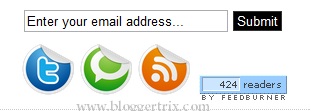
Feed Subscription is important in bloggers.Because it helps to get new post by email.So, today i bring a nice feed subscription widget with counter. It Include Twitter and Technorati.You can check my other Rss subscribe widget from here. Follow this simple steps to add it to your blog.

1.  Log in to blogger account > Go to Design >> Page Element

2. Click Add Gadget and select 'HTML/Javascript'

3. Paste below code.


<div class='widget-content'>
<div class='third' style="border:0px solid #000;">
<center>
<form style="padding-top:6px;" id="subscribe" action="http://feedburner.google.com/fb/a/mailverify" method="post" target="popupwindow" onsubmit="window.open('http://feedburner.google.com/fb/a/mailverify?uri=bloggertrix', 'popupwindow', 'scrollbars=yes,width=550,height=520');return true">
<input type="text" value="Enter your email address..." id="subbox" onfocus="if (this.value == &#39;Enter your email address...&#39;) {this.value = &#39;&#39;;}" onblur="if (this.value == &#39;&#39;) {this.value = &#39;Enter your email address...&#39;;}" name="email" style="width:200px;" />
<input type="hidden" value="Bloggertrix" name="uri" />
<input type="hidden" name="loc" value="en_US" />
<input style="
        padding-left:3px;
        padding-right:3px;
        border: 1px solid #333333;
        cursor: pointer;
        background-color: #000000;
        color: #FFFFFF;"
type="submit" value="Submit" />
</form>

</center>
<center>
<table border="0">
<tr>
<td>
<a href="http://twitter.com/bloggertrix" target="_blank" title="Follow Me On Twitter">
<img style="width:54px; height:54px;" src="https://blogger.googleusercontent.com/img/b/R29vZ2xl/AVvXsEjxWunIvmE9g4-mRjKEMx0TCQGOJdtJvZvy3otHOfMNAjTSP0bfey915mscmpKKd4mfalGNKU8xYxrz88SzKBVKM94DQKVk5gsL4xo_oGHBrFYqY3r_h8JFMNfyQ4zlr799plzECM2lz7o/s800/EAB_twitter%2520icon.png" /></a>
</td>
<td>
<a href="http://technorati.com/faves?sub=addfavbtn&add=http://www.bloggertrix.com" target="_blank" title="Add To Technorati">
<img style="width:54px; height:54px;" src="https://blogger.googleusercontent.com/img/b/R29vZ2xl/AVvXsEiOGcgvAe7tr2rAlsg9QM4pgaMWa-kWU2j7mPDJ6sB_OzgKEHXQVOVYEXEX-RuCUrO1s6N0azvvlMybif6FUKj1JaU4ml4CF6qshvDkQEJdWzc7h6v6B0Lbeut1f3XG4KqkGKqjnssSTX8/s800/EAB_technorati%2520icon.png" /></a>
</td>
<td>
<a href="http://feeds.feedburner.com/bloggertrix" target="_blank" title="Subscribe Via RSS">
<img style="width:54px; height:54px;" src="https://blogger.googleusercontent.com/img/b/R29vZ2xl/AVvXsEgBI0CGLaH7vo-GWeCFgCpQrxpaSdRBi7h3AM7ixWCEzNohLBhyphenhyphen5LtYtab_VKU-4Qrr-rAPHZb3sLry_wqpjteOc_sG0z8R80uQyKNyWZ1sWz4LTByE6FeJja69Ll1wZnARGRj2-RVmM5g/s800/EAB_rss.png" /></a>
</td><td><td>
<br/><br/>
<a href="http://feeds.feedburner.com/bloggertrix"><img src="http://feeds.feedburner.com/~fc/bloggertrix?bg=99CCFF&amp;fg=444444&amp;anim=1" height="26" width="88" alt="Fellow Readers" /></a>
</td></td></tr></table></center></div></div>

Replace bloggertrix with your Facebook fan page Id
Replace bloggertrix with your twitter Username
Replace bloggertrix with your Feedburner Id 
Replace bloggertrix.com with your site name
                                 
4. Save HTML/Javascript. you are done.
 

Read More »

Attractive Feed Subscription Form Widget For Blogger

VM | 2:36 pm | Be the first to comment!


This is a Cool Rss Subscribe box. Actually if we hope to increase our Rss, we must have good article with attractive subscription gadget. Therefore visitors force to subscribe via Rss because they can get quality articles via emails. Earlier I posted about How To Add Search  Box With Subscriber Gadget For Blogger


1. Log in to blogger  Design > Page Element.

2. Click Add Gadget and select 'HTML/Javascript

3.Now Paste One of below code style as your like

Style 1

 <style type="text/css">
#btrix-emailbox {
    background: url(https://blogger.googleusercontent.com/img/b/R29vZ2xl/AVvXsEi8vFwEc3cmm5iUBPXZ7FI4v4b0zKPnxRBdrNJnQf-w6bBXHd-Zh0Zf5MTlaCIarO7PlLrUWWFqztG7riKMpI8YVoOgPCty3SfWQqzhAtgjgP_uiSlk3q6ZwIdklOnku48-FHiLz5pwb98I/s1600/btrix-red.png)no-repeat scroll center center transparent;
    height: 143px;
    width: 368px;
}

form#btrix-emailform {
    display: block;
    margin: 0;
    padding-left: 42px;
    padding-top: 67px;
}

form#btrix-emailform #s {
    background: transparent;
    border: none;
    color: #444242;
    font-family: georgia;
    font-size: 15px;
    font-style: italic;
    height: 30px;
    margin-top: -2px;
    padding-left: 2px;
    vertical-align: top;
    width: 227px;
}

form#btrix-emailform #sbutton {
    background: transparent;
    border: none;
    cursor: pointer;
    height: 30px;
    padding-right: 45px;
}</style>

<div id="btrix-emailbox">
    <form id="btrix-emailform" action="http://feedburner.google.com/fb/a/mailverify"
    method="post" target="popupwindow" onsubmit="window.open('http://feedburner.google.com/fb/a/mailverify?uri=bloggertrix', 'popupwindow', 'scrollbars=yes,width=550,height=520');return true">
        <input type="hidden" value="bloggertrix" name="uri" />
        <input type="text" id="s" name="email" value="Enter Your E-Mail Here"
        onfocus='if (this.value == "enter your e-mail here") {this.value = ""}'
        onblur='if (this.value == "") {this.value = "enter your e-mail here";}'
        />
        <input type="hidden" name="loc" value="en_US" />
        <input type="image" src="http://img1.blogblog.com/img/blank.gif" id="sbutton"
        />
    </form>
</div>

Style 2


<style type="text/css">
#btrix-emailbox {
    background: url(https://blogger.googleusercontent.com/img/b/R29vZ2xl/AVvXsEi8vFwEc3cmm5iUBPXZ7FI4v4b0zKPnxRBdrNJnQf-w6bBXHd-Zh0Zf5MTlaCIarO7PlLrUWWFqztG7riKMpI8YVoOgPCty3SfWQqzhAtgjgP_uiSlk3q6ZwIdklOnku48-FHiLz5pwb98I/s1600/btrix-red.png)no-repeat scroll center center transparent;
    height: 143px;
    width: 368px;
}

form#btrix-emailform {
    display: block;
    margin: 0;
    padding-left: 42px;
    padding-top: 67px;
}

form#btrix-emailform #s {
    background: transparent;
    border: none;
    color: #444242;
    font-family: georgia;
    font-size: 15px;
    font-style: italic;
    height: 30px;
    margin-top: -2px;
    padding-left: 2px;
    vertical-align: top;
    width: 227px;
}

form#btrix-emailform #sbutton {
    background: transparent;
    border: none;
    cursor: pointer;
    height: 30px;
    padding-right: 45px;
}</style>

<div id="btrix-emailbox">
    <form id="btrix-emailform" action="http://feedburner.google.com/fb/a/mailverify"
    method="post" target="popupwindow" onsubmit="window.open('http://feedburner.google.com/fb/a/mailverify?uri=bloggertrix', 'popupwindow', 'scrollbars=yes,width=550,height=520');return true">
        <input type="hidden" value="bloggertrix" name="uri" />
        <input type="text" id="s" name="email" value="Enter Your E-Mail Here"
        onfocus='if (this.value == "enter your e-mail here") {this.value = ""}'
        onblur='if (this.value == "") {this.value = "enter your e-mail here";}'
        />
        <input type="hidden" name="loc" value="en_US" />
        <input type="image" src="http://img1.blogblog.com/img/blank.gif" id="sbutton"
        />
    </form>
</div>

Style 3


<style type="text/css">
#btrix-emailbox {
    background: url(https://blogger.googleusercontent.com/img/b/R29vZ2xl/AVvXsEj2eWaKvRJxuKrE9pjdRGXIkow6mcM7Y7rBR6GtB_30QOBzq19BbNqXgdPb7TIBMuOyKN4beCW9pvIJ3C0xWZbpfJkvOB32d9onAF1MN9QutZBnFaLFP3Q463VtEZavavAT3xqLtIkFCsSI/s1600/btrix.blue.png)no-repeat scroll center center transparent;
    height: 143px;
    width: 368px;
}

form#btrix-emailform {
    display: block;
    margin: 0;
    padding-left: 42px;
    padding-top: 67px;
}

form#btrix-emailform #s {
    background: transparent;
    border: none;
    color: #444242;
    font-family: georgia;
    font-size: 15px;
    font-style: italic;
    height: 30px;
    margin-top: -2px;
    padding-left: 2px;
    vertical-align: top;
    width: 227px;
}

form#btrix-emailform #sbutton {
    background: transparent;
    border: none;
    cursor: pointer;
    height: 30px;
    padding-right: 45px;
}</style>

<div id="btrix-emailbox">
    <form id="btrix-emailform" action="http://feedburner.google.com/fb/a/mailverify"
    method="post" target="popupwindow" onsubmit="window.open('http://feedburner.google.com/fb/a/mailverify?uri=bloggertrix', 'popupwindow', 'scrollbars=yes,width=550,height=520');return true">
        <input type="hidden" value="bloggertrix" name="uri" />
        <input type="text" id="s" name="email" value="Enter Your E-Mail Here"
        onfocus='if (this.value == "enter your e-mail here") {this.value = ""}'
        onblur='if (this.value == "") {this.value = "enter your e-mail here";}'
        />
        <input type="hidden" name="loc" value="en_US" />
        <input type="image" src="http://img1.blogblog.com/img/blank.gif" id="sbutton"
        />
    </form>
</div>

After paste one of above code
* Replace bloggertrix with your feedburner name

4. Now save your HTML/Javascript'.

    You are done... 

Read More »
Related Posts Plugin for WordPress, Blogger...

Subscribe Updates, Its FREE!