-
Showing posts with label Social Media. Show all posts

2 March 2013

Sliding Social Widget for Blog

VM | 9:28 pm | | Be the first to comment!

L
ets Jump into another Sliding widget for Share your Post in Social Network.This Css3 Sliding will full custom and fully Easy implement in Blog . Try this ...widget..
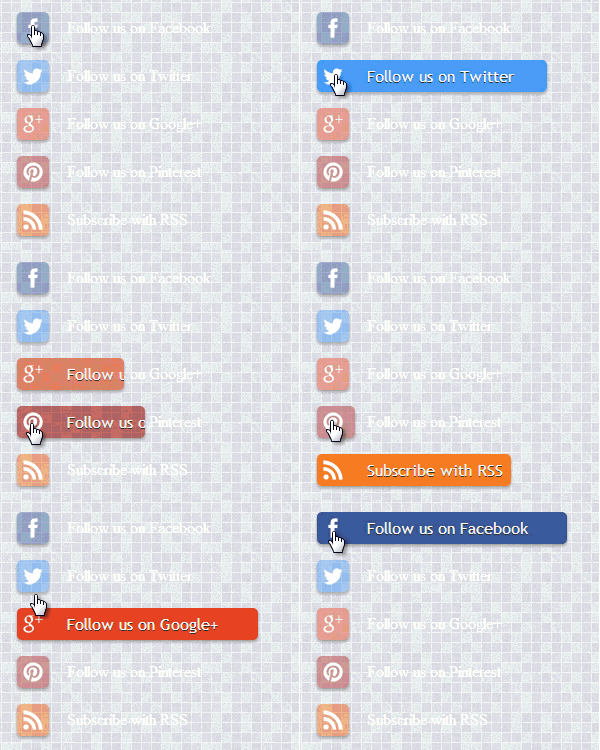


1. Log in to blogger account and Click drop down.


2. Now select "Template" Like Below.


3. Now you can see Live on blog, Click EDIT HTML Button"

4. Now click Proceed button.
   
5. Find this tag by using Ctrl+F    ]]></b:skin>

6. Paste below code Before ]]></b:skin> tag

#tbisose{list-style:none; text-decoration:none; font-size:0.9em; font-family:trebuchet ms,sans-serif;}
#tbisose a{text-decoration:none; font-family:trebuchet ms,sans-serif;}
#tbisose li{position:relative; height:38px; cursor:pointer; padding: 0 !important;}
#tbisose .facebook, .googleplus, .pinterest, .rss, .twitter{position:relative; z-index:5; display:block; float:none; margin:10px 0 0; width:210px; height:38px; border-radius:5px; background:url(https://blogger.googleusercontent.com/img/b/R29vZ2xl/AVvXsEgPvoxFwni9xJlDuDt9kE9jBRUdZv-V8qL90rLz3UYqsBnohvQC6OnxXwyjgLD6OPUXkYE6mZwUKYFUBIDVgklBCOB9grjhj8WPuiIS_aoJdYdS4xTJ0wQyQ3KH7snkkRUhCJcKWgucW8k/s800/sprites.png) no-repeat;  background-color:rgba(217,30,118,.42); -webkit-box-shadow:rgba(0,0,0,.28) 0 2px 3px; -moz-box-shadow:rgba(0,0,0,.28) 0 2px 3px;  box-shadow:rgba(0,0,0,.28) 0 2px 3px; color:#FFFFFF; text-align:left; text-indent:50px; text-shadow:#333 0 1px 0; white-space:nowrap;  line-height:32px; -webkit-transition:width .25s ease-in-out,background-color .25s ease-in-out; -moz-transition:width .25s ease-in-out,background-color .25s ease-in-out; -ms-transition:width .25s ease-in-out,background-color .25s ease-in-out; -o-transition:width .25s ease-in-out,background-color .25s ease-in-out; transition:width .25s ease-in-out,background-color .25s ease-in-out; -o-box-shadow:rgba(0,0,0,.28) 0 2px 3px;}
#tbisose li:after{position:absolute; top:0; left:50px; z-index:2; display:block; height:38px; color:#FFFFFF; content:attr(data-alt);  line-height:32px;}
#tbisose .icon{overflow:hidden; color:#fafafa;}
#tbisose .facebook{width:32px; height:32px; background-color:rgba(59,89,152,0.42); background-position:0 0;}
#tbisose .twitter{width:32px; height:32px; background-color:rgba(64,153,255,0.42); background-position:0 -33px;}
#tbisose .googleplus{width:32px; height:32px; background-color:rgba(228,69,36,0.42); background-position:-3px -66px;}
#tbisose .pinterest{width:32px; height:32px; background-color:rgba(174,45,39,0.42); background-position:0 -95px;}
#tbisose .rss{ width:32px;  height:32px;  background-color:rgba(255,102,0,0.42); background-position:-3px -126px;}
#tbisose li:hover .icon,
.touch #tbisose li .icon{width:250px;} /*----to change the width of the sliding----*/
.touch #tbisose li .facebook, #tbisose li:hover .facebook{background-color:rgba(59,89,152,1);}
.touch #tbisose li .twitter, #tbisose li:hover .twitter{background-color:rgba(64,153,255,1);}
.touch #tbisose li .googleplus, #tbisose li:hover .googleplus{background-color:rgba(228,69,36,1);}
.touch #tbisose li .pinterest, #tbisose li:hover .pinterest{background-color:rgba(174,45,39,1);}
.touch #tbisose li .rss, #tbisose li:hover .rss{background-color:rgba(255,102,0,1);}

7. Go to blogger and click Layout

8. Click Add Gadget and select 'HTML/Javascript

9. Paste below code


 <ul id="tbisose">
<li data-alt="Follow us on Facebook"><a href="https://www.facebook.com/yourID" class="icon facebook">Follow us on Facebook</a></li>
<li data-alt="Follow us on Twitter"><a href="https://twitter.com/yourusername" class="icon twitter">Follow us on Twitter</a></li>
<li data-alt="Follow us on Google+"><a href="https://plus.google.com/yourID" class="icon googleplus">Follow us on Google+</a></li>
<li data-alt="Follow us on Pinterest"><a href="http://pinterest.com/yourusername/" class="icon pinterest">Follow us on Pinterest</a></li>
<li data-alt="Subscribe with RSS"><a href="http://feeds.feedburner.com/yourid" class="icon rss">Subscribe with RSS</a></li>
</ul>

REplace your ID and USER name in High lighted area

10. Now save your HTML/Javascript'.

    You are done... 


Read More »

21 February 2013

HOW TO ADD COLOURFULL SOCIAL BUTTONS TO BLOGGER WITH HOVER EFFECT?

VM | 7:33 pm | Be the first to comment!
Something is fishy happening in google headquarters every day they  started the morning with a new penalty for bloggers and webmasters by releasing algorithm updates,changing there polices and doing something strange to keep SERP clean. They have released latest algo updates two times a month in the history of algorithms.
So bloggers and webmasters keeping google aside are taking shadows of social media quality Dofollow backlinks to genrate there traffic and revenue.So here we are today we have relased the widget to solve all these problems with the simplicity and with the great ease colourfull social buttons with hover effect which will enhance your blog beauty we have put a new entire look to it which will greatly enhance your visitors so in this post we will tell you ,How to add colourfull social buttons with hover effect to your blogger blog.


How To Add Social Media Buttons To Your Blogger Sidebar   

  • Go to your blog Layout section > Add A Gadget > HTML
  • Paste the above whole html code in it and save it 
                                                                                      

                     <div class="widget-wrap"> <div class="textwidget"><div class="btnt-chronicl-social"><ul><li><a class="rss" href="http://feeds.feedburner.com/blogging-heaven" target="_blank" rel="nofollow">Subscribe to the RSS Feed</a></li><li><a class="twitter" href="https://twitter.com/bloggingheaven" target="_blank">Follow us on Twitter</a></li><li><a class="facebook" href="http://www.facebook.com/bloggingheaven" target="_blank" rel="nofollow">Find us on Facebook</a></li><li><a class="google" href="https://plus.google.com/b/117673509889199905342/117673509889199905342" target="_blank" rel="nofollow">Join us on Google+</a></li><li><a class="linkedin" href="http://my.linkedin.com/bloggingheaven/" rel="nofollow" target="_blank">Connect with me on LinkedIn</a></li></ul></div><style type="text/css">/*<![CDATA[*/ .btnt-chronicl-social { width: 270px; margin: -10px; }.btnt-chronicl-social ul { margin: 0; padding: 0; }.btnt-chronicl-social ul li { list-style:none; padding: 0; text-transform: none; }.btnt-chronicl-social ul li a { color: #fff; display:block; }.btnt-chronicl-social ul li a:hover { color: #c9c9c9; background-color: #333; }.btnt-chronicl-social ul li .rss { background: url("http://i1203.photobucket.com/albums/bb382/chandeep10/social-icons/RSS-1.png") no-repeat scroll 10px center #F87E12; background-size: 20px; padding: 17.5px 45px; }.btnt-chronicl-social ul li .twitter { background: url("http://i1203.photobucket.com/albums/bb382/chandeep10/social-icons/Twitter.png") no-repeat scroll 10px center #4CACEE; background-size: 20px; padding: 17.5px 45px;}.btnt-chronicl-social ul li .facebook { background: url("http://i1203.photobucket.com/albums/bb382/chandeep10/social-icons/Facebook-1.png") no-repeat scroll 10px center #3B5998; background-size: 20px; padding: 17.5px 45px; }.btnt-chronicl-social ul li .google { background: url("http://i1203.photobucket.com/albums/bb382/chandeep10/social-icons/google.png") no-repeat scroll 10px center #D44937; background-size: 20px; padding: 17.5px 45px; }.btnt-chronicl-social ul li .linkedin { background: url("http://i1203.photobucket.com/albums/bb382/chandeep10/social-icons/LinkedIn-1.png") no-repeat scroll 10px center #3692C3; background-size: 20px; padding: 17.5px 45px; }/*]]>*/</style></div> </div> 

Change The Username In The Code 

  1. Red one with your feedburner username
  2. Brown one with your twitter username
  3. Green one with your facebook username
  4. Blue one with your linked in username
If you want to remove the linked in tab cuz most of us dont have the linked in profile so just remove the coloured  line in the code
                  <li><a class="linkedin" href="http://my.linkedin.com/bloggingheaven/" rel="nofollow" target="_blank">Connect with me on LinkedIn</a></li>

Read More »

6 February 2013

Peeling Stickers Social Media Widget For Blogger

VM | 9:50 am | 1 Comment so far


In this post  im  gonna  explain  how to add peeling
social   sharing  buttons  for  your blog. This is just
widget.  you can  add  it  to  your blog easily. I just
using Css  with  HTML.


 1. Log in to blogger  Design > Page Element.

2. Click Add Gadget and select 'HTML/Javascript

3.Now Paste Below code.

<style>
p#socialicons img {    -moz-transition: all 0.2s ease-in-out;    -webkit-transition: all 0.2s ease-in-out;    -o-transition: all 0.2s ease-in-out;    -ms-transition: all 0.2s ease-in-out;    transition: all 0.2s ease-in-out;}
p#socialicons img:hover {    -moz-transform: rotate(70deg);    -webkit-transform: rotate(70deg);    -o-transform: rotate(70deg);    -ms-transform: rotate(70deg);    transform: rotate(70deg);}
p#socialicons1 img {    -moz-transition: all 0.8s ease-in-out;    -webkit-transition: all 0.8s ease-in-out;    -o-transition: all 0.8s ease-in-out;    -ms-transition: all 0.8s ease-in-out;    transition: all 0.8s ease-in-out;}
p#socialicons1 img:hover {    -moz-transform: rotate(360deg);    -webkit-transform: rotate(360deg);    -o-transform: rotate(360deg);    -ms-transform: rotate(360deg);    transform: rotate(360deg);}
p#socialicons2 img {    -moz-transition: all 0.5s ease-in-out;    -webkit-transition: all 0.5s ease-in-out;    -o-transition: all 0.5s ease-in-out;    -ms-transition: all 0.5s ease-in-out;    transition: all 0.5s ease-in-out;}
p#socialicons2 img:hover {    -moz-transform: rotate(-360deg);    -webkit-transform: rotate(-360deg);    -o-transform: rotate(-360deg);    -ms-transform: rotate(-360deg);    transform: rotate(-360deg);}</style>

<center><p id="socialicons">   
<a href="http://www.facebook.com/Username" target="_blank"><img border="0" src="https://blogger.googleusercontent.com/img/b/R29vZ2xl/AVvXsEjId5CWlgzx5THV1vEwph4_6IBT520KPG0SsboaSP4CnhsmmY_XYxGSV_iDEtI2qEV7860N26QR_9wQl8VS3uTLst-FTSAZ8G-Z8pdwi6CimsHKCvF_SO9DaJOjINQVvSvHtZpvs1l5jj0/s1600/bloggertrix-facebook.png" /></a>   
<a href="http://www.twitter.com/Username" target="_blank"><img border="0" src="https://blogger.googleusercontent.com/img/b/R29vZ2xl/AVvXsEgJDdOtEsPbLrKygt7WB4TTcWDUmtCdB7ttRW7ZWKN4JIb4SBZFKP2w7Xp9GYFO2CuF1MzMkfpdjQvESn2xuj8qHxl0tQl5JeLFKnfIVBuKd-7HurDtDiZJJAkBdROme4EjxyLuCl3xv2c/s1600/bloggertrix-rss.png" /></a>   
<a href="https://www.stumbleupon.com/Username" target="_blank"><img border="0" src="https://blogger.googleusercontent.com/img/b/R29vZ2xl/AVvXsEjr6IKAc2ziBgqehdv0BD5VMyz_xRUZvBX2K77pyWfuxHmSUwT3F9LYdlTNsjnQkGtFQ8PHySr95G2lHZh2Aajh5yZgHpPpRkEUfYkOAQ5TDT66xsow7E5MA0PCYMiz4mZg2JyWm5194DA/s1600/bloggertrix-stumbleupon.png" /></a>   
<a href="http://feeds.feedburner.com/Username/" target="_blank"><img border="0" src="https://blogger.googleusercontent.com/img/b/R29vZ2xl/AVvXsEi8RDb2WkR7-opa087ADuIdnhtTyx7_5RfF8qyGwqxTCQjG-8oCn7GFuwuijgQBMc9PhUtnrdXpU_cY_S4go7LNOrRvGPPpcKNOcGjBLipPPB3vWaWUNIoghB-ioxIA3f8F0G7SwPeNn5g/s1600/bloggertrix-twitter.png" /></a></p>
</center>

After paste above code
* Replace Username with your facebook username
*Replace  Username  with your  twitter Username
*Replace  Username with Google plus id
*Replace  Username with feedburner username

4. Now save your HTML/Javascript'.

    You are done... 
Read More »

13 September 2012

Social Share Buttons

VM | 12:37 am | Be the first to comment!
Touch Me Sharing Widget


The rapid advancement and development of Social Media and growing interest of people in social networking sites has given birth to dozens of social sharing tools and services. Web masters are getting addicted to these tools because unlike organic traffic from search engines, web traffic from social channels have overtaken search traffic. Bloggers today depend largely on networks like Facebook, Google plus and twitter to drive traffic to their blogs. These tools are good only if they can attract a visitor to bookmark and share your content. From your website quality content till your blog design, every single bit counts in turning a visitor into a follower. To help you with your dream of increasing  fans and readers we bring you "Touch Me". Its named such due to its appealing look that forces a visitor to roll hover the cursor over the icons and hit follow! :) This gadget is neatly structured using buttons from popular services like Google Plus, Facebook, Twitter and RSS. We have coded it neatly using basic HTML and some spicy CSS styles. 

DEMO

Add it to blogger

I am sharing below the steps for BlogSpot users. If you are a wordpress or Joomla user or running a normal website then you just need to copy and paste the following code inside your templates.
Following are the steps for blogger users
  1. Go To Blogger > Layout
  2. Choose add a gadget
  3. Select HTML/JavaScript
  4. Paste the following code inside it, 
<style>
    /*--------Touch Me Sharing Widget ------*/
    .touchme a {
    display:block;
    height:50px;
    width:50px;
    padding:0 4px;
    float:left;
    background:transparent url(https://blogger.googleusercontent.com/img/b/R29vZ2xl/AVvXsEjAfGOWHbi-l99tfFgzj7mmuqRGU0wq4Q-ZzataVOmzBI4TCyWemVKGODR4BJ0VuLsX2H1t9cW2So25BCdccIatETTJwEMnNj52CeZ-jHOr1ayOqRYqyhfuCq8dSuoa75yqJa_8MC_6C6c/s1600/Sharing+Touch+Me.png) no-repeat;
    -webkit-transition: ease-in 0.2s all;  
    -moz-transition: ease-in 0.2s all;  
    -o-transition: ease-in 0.2s all;  
    -ms-transition: ease-in 0.2s all;  
    transition: ease-in 0.2s all;
    cursor:pointer;

    }


    .touchme a.googleplus {
    background-position: 0px -58px;

    }
    .touchme a.googleplus:hover {
    background-position: 0px 0px;
    }


    .touchme a.twitter {
    background-position: 0px -290px;

    }
    .touchme a.twitter:hover {
    background-position: 0px -232px;

    }
    .touchme a.facebook {
    background-position: 0px -406px;

    }
    .touchme a.facebook:hover {
    background-position: 0px -348px;

    }


    .touchme a.rss {
    background-position: 0px -174px;

    }
    .touchme a.rss:hover {
    background-position: 0px -116px;

    }


    </style>


    <div class='touchme'>

    <!--RSS-->
    <a class='rss' href="YOUR RSS LINK" rel='external nofollow' target='_blank'></a>

    <!--Google Plus-->
    <a class='googleplus' href="YOUR GOOGLE PROFILE LINK" rel='external nofollow' target='_blank'></a>

    <!--Facebook-->
    <a class='facebook' href="YOUR FACEBOOK LINK" rel='external nofollow' target='_blank'></a>

    <!-- Twitter -->
    <a class='twitter' href="YOUR TWITTER LINK" rel='external nofollow' target='_blank' ></a>


    </div>

Please fill these requirements:
  • Replace YOUR RSS LINK with your Feed burner link.
  • Replace YOUR GOOGLE PROFILE LINK with your Google+ URL
  • Replace YOUR FACEBOOK LINK with your Facebook URL
  • Replace YOUR TWITTER LINK with your Twitter Profile URL
         5. Hit save and you are all done!
Read More »

11 September 2012

Add Inside Floating Social Bookmark Widget For Blogger

VM | 3:43 pm | Be the first to comment!
This is a another cool floating bookmark menu your blog. I include with attractive inside icons for this widget.This  floating menu will appear every post in your blog.So, visitors will always get this gadget.because of it floating bookmark is the helps to increase your facebook fan, Twitter followers, and Rss subscribers. you can do with easy steps. Follow these steps to add it your blog. if you want to use this gadget in specific page, use this post.

How To Show Blogger Gadget/ Widget In Specific Pages

DEMO

 
1. Log in to blogger account and Go to Design >> Edit HTML
    (make sure backup your template first)

2. Find this tag by using Ctrl+F    ]]></b:skin>

3. Paste below code Before ]]></b:skin> tag

.bt-wdt{
 position: fixed;
 right: 10px;
 top: 43%;
}

.bt2-wdt{
 position: fixed;
 right: 30px;
 bottom: 22%;
}

.bt-wdt img{
 float: right;
 clear: right;
 margin: 5px;
 -webkit-transition: all .2s ease-in-out;
 -moz-transition: all .2s ease-in-out;
 -o-transition: all .2s ease-in-out;
 transition: all .2s ease-in-out;
}
.bt-wdt img:hover{
 -moz-transform: scale(1.2) rotate(6deg);
 -webkit-transform: scale(1.2) rotate(6deg);
 -o-transform: scale(1.2) rotate(6deg);
 -ms-transform: scale(1.2) rotate(6deg);
 transform: scale(1.2) rotate(6deg);
}

4. Now Go to Design >> Page Element

5. Click Add Gadget and select 'HTML/Javascript'

6. Paste  below code.

<!-- www.bloggertrix.com -->
<div class="bt-wdt">
 <!-- Facebook -->
 <a href="http://www.facebook.com/Page-Name" title="Join me on Facebook" target="_blank"><img alt="Join me on Facebook" src="https://blogger.googleusercontent.com/img/b/R29vZ2xl/AVvXsEihopxgSLzP05G3bqEhxS5RUT-IcYlg89hcN8BPXydZGUY1Xr3QlOYrs6dpgKyO_U19i3xRBhCGoI6xNBoCc5Ypw6NCJs3miEfQt6_NcCRfLHdkd2iUX0lNZa0BrKM-JFt-xg8Kz3PvKxA4/s1600/inside-facebook-icon.png" /></a>
 <!-- Twitter -->
 <a href="http://twitter.com/USERNAME" title="Follow me on Twitter" target="_blank"><img alt="Follow me on Twitter" src="https://blogger.googleusercontent.com/img/b/R29vZ2xl/AVvXsEjzvgmn43f8xRwOOHAEd1tv8DQ6j-6CdKch91rQzZQy_3TepDGLkFlkP9Bh8udAt1pjvYAm-J4doGOO3z6yO7amOra4rS11NaFNCIeFs2Ytk46J2Bc4mpagTO9kLUppqp5SmWCn1A5uhNuj/s320/inside-twitter-icon.png" /></a>
 <!-- RSS -->
 <a href="http://feeds.feedburner.com/feed-address" title="Subscribe to RSS" target="_blank"><img alt="Subscribe to RSS" src="https://blogger.googleusercontent.com/img/b/R29vZ2xl/AVvXsEgd83K6CB32KLyvdATJtl1BxeJD7SvvxOTveWHGXY_rTmS0fQa1eH4QoFS_9ttd2oUNyukDomANzHKtRJqhSZ2VJI87_nUZcOe_kUdpSKaPy8FNm0qoYNftK6nDXcxQH-OLKIpw86jNZ8YY/s1600/inside-rss-icon.png" /></a>
</div><div class="bt2-wdt"><a style=" font-size:9px; color:#3B78CD; text-decoration:none;"href="http://www.bloggertrix.com/2012/05/how-to-add-smooth-jquery-facebook-like.html"> Get This</a>
</div>
<!-- End -->

*Replace Page-Name With your facebook page name
*Replace USERNAME with your twitter username
*Replace  feed-address with your feedburner address.

7. Now save your template
 you are done. 
Read More »

Social Network Widget With Spinning Hover Effect For Blogger

VM | 2:31 pm | 1 Comment so far
cool-social-widget 

 This is cool widget for your blog. This is cool social widget. you can add it on side bar. Its have nice hover style.So, it will helps to attractive your blog.Black And White Social  Network Widget With Color Hover Style  For Blogger. Follow these steps to add it to your blog.


1. Log in to blogger  Design > Page Element.

2. Click Add Gadget and select 'HTML/Javascript

3.Now Paste Below code.


 <style>p#socialicons img {
    -moz-transition: all 0.8s ease-in-out;
    -webkit-transition: all 0.8s ease-in-out;
    -o-transition: all 0.8s ease-in-out;
    -ms-transition: all 0.8s ease-in-out;
    transition: all 0.8s ease-in-out;
}
p#socialicons img:hover {
    -moz-transform: rotate(360deg);
    -webkit-transform: rotate(360deg);
    -o-transform: rotate(360deg);
    -ms-transform: rotate(360deg);
    transform: rotate(360deg);
}
/* Spinning Social Icons Widget By bloggertrix.com */
</style>
<center><p id="socialicons">
    <a href="http://www.facebook.com/bloggertrix/">
<img border="0" src="https://blogger.googleusercontent.com/img/b/R29vZ2xl/AVvXsEiYKga4lQ57ErtTyJIjSb_AXcbnQ9oSEVFd7HBKw5Jn08AX8Akp8W04sX-FAt6uUgloLHl5CM2ou7_DdtaE0LiTehRqWXQLCm53XFgY6dtcC-a6HK5nMLuTy5DAIRqAgdrjAYo-G4y01aCR/s1600/facebook.png" /></a>
    <a href="http://www.twitter.com/bloggertrix/">
<img border="0" src="https://blogger.googleusercontent.com/img/b/R29vZ2xl/AVvXsEiH3gHvSuezqPmzrBTaD2f4drvhJEXLVO0enM0Vuei4Htb3q1wfbpAHg7kMJb5sd_Pv5YajR80TzzKgysKQV_9F5QXTnKPrD8KNuUgfFEJvuXhqruRtf1TfgOUgsnL_jZzclgtKV5nUB_-6/s1600/twitter.png" /></a>
    <a href="https://plus.google.com/107955298793879607964">
<img border="0" src="https://blogger.googleusercontent.com/img/b/R29vZ2xl/AVvXsEhCsy7ZQRTXxWoFuab4cZgQ7-AshxwqNNCiCOKSA9WqeqTRLnPlp8rqdtKw_SO8M83-J0XhDSPtMYw04NBI_RpRZgzQj5eFDUOyyn94ButB6QUeZMA6cgK02Lr5BVXRWv2ckW0k27VJjcDM/s1600/googleplus.png" /></a>
    <a href="http://www.feeds.feedburner.com/bloggertrix/">
<img border="0" src="https://blogger.googleusercontent.com/img/b/R29vZ2xl/AVvXsEi1GBKsazG_2V56acwMowrVm-J0mIPLCoIZ300Sitjw5GMgbFipNOioMEAYsnOYnbUfGbUdJJxVgLqrLlV5Lef12pL_8v0vPfcyoxOhnZR8F74x5amfRyBs0GhAFjwUeW9mn-tzDEC863ix/s1600/rss.png" /></a>
    <a href="http://www.youtube.com/bloggertrix/">
<img border="0" src="https://blogger.googleusercontent.com/img/b/R29vZ2xl/AVvXsEjfxm5kw6Ecrw-M__nRZmwBwJTXiLVTGXi3I8P4gMP2hDxSg4wkQEE_6snbdUhT7yCAjoebfpSSBfUv0WjeaWGy6sPiSkGQwFzd9hYHVihceMcksnSLBdhAtfDe1NwBzSO9H2KMzb6hmqWg/s1600/youtube.png" /></a>
</p></center>

After paste above code
* Replace bloggertrix with your facebook username
*Replace bloggertrix  with your  twitter Username
*Replace 107955298793879607964 with Google plus id
*Replace bloggertrix with feedburner username
*Replace bloggertrix with your your-tube username.
4. Now save your HTML/Javascript'.


Read More »
Related Posts Plugin for WordPress, Blogger...

Subscribe Updates, Its FREE!